

Snowflake export settings
- Snowflake configuration: Defaults to Custom, which lets you configure the account, users and roles, warehouses, databases, and schemas. After you save a configuration, it becomes available in the dropdown menu.
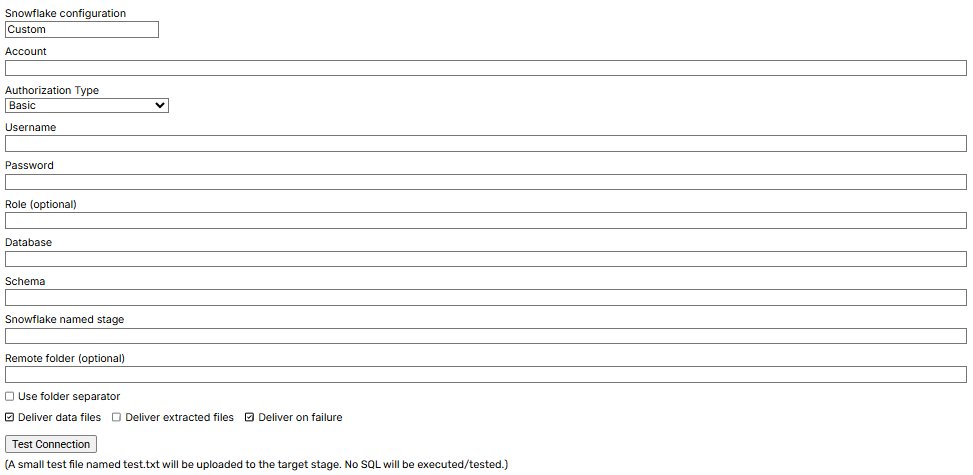
- Account: Specifies the identifier unique to your Snowflake environment. A connection string commonly uses the format
snowflake://username:password@account.region.snowflakecomputing.com. - Authorization Type: Specifies Basic Authentication, Private Key Authentication, or Private Key with Passphrase.
- Basic: The default method. The client sends the username and password encoded in Base64 as part of the HTTP request header.
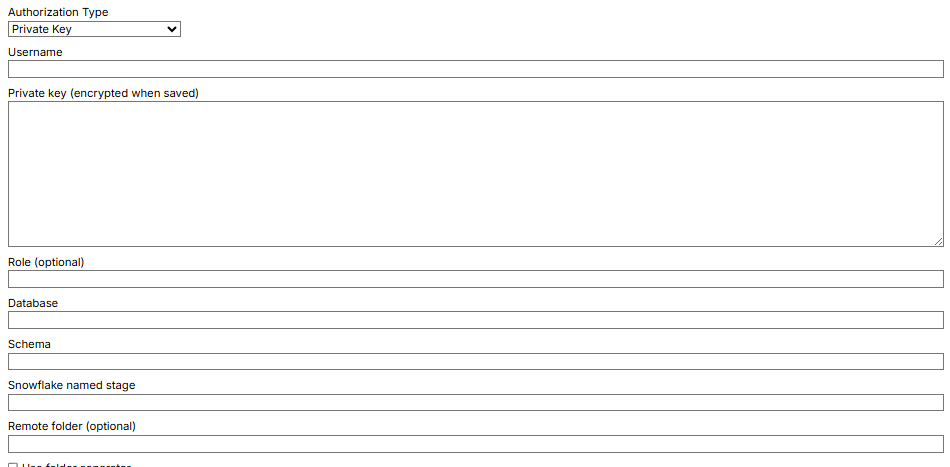
- Private key: Uses asymmetric cryptography. The private key remains confidential, while the corresponding public key is stored in Snowflake. Provide the credentials in JSON format.
- Private Key with Passphrase: Encrypts the private key with a passphrase.
- The private key remains confidential and is secured with a passphrase known only to the user.
- The corresponding public key is stored in Snowflake.
- During authentication, provide a JSON object containing the encrypted private key and the passphrase used to decrypt it.
- This adds a second required secret to private key authentication.
- Private key (encrypted when saved): Uses an asymmetric key pair. The private key remains confidential, while the public key is stored in Snowflake. Provide the credentials in JSON format.
- Username: Specifies the Snowflake user account identifier.
- Role: Specifies the role that defines the user’s permissions in the Snowflake account.
- Database: Specifies the Snowflake database that contains schemas and data.
- Schema: Specifies a logical group of tables, views, and other database objects, such as
PUBLIC. - Snowflake named stage: Specifies the Snowflake object that points to a cloud storage location.
- Deliver Data Files: Defaults to
true, which delivers exported data files such as CSV or Parquet. - Deliver Extracted Files: Defaults to
false. Set it totrueto deliver downloaded files such as HTML, images, or PDFs. - Deliver on Failure: Defaults to
false. Set it totrueto deliver files even when the Agent fails. - Test connection: After completing the account, username, password, and other required details, tests whether the named Snowflake connection was established successfully.
Execute SQL
Use this section to run SQL statements or batches after delivery, enabling database operations such as data creation, updates, and queries.- Snowflake post-delivery SQL: Agent data is first uploaded to a Snowflake stage instead of directly to a table. You can then use SQL to copy the staged data into the target table.
- Execute SQL after file delivery to stage: Enables SQL that updates and manages staged data before it is loaded into the main database.
- Warehouse: Specifies the compute resource that runs SQL queries and data processing. This field is optional when the Snowflake user already has a default warehouse, but you can select another warehouse when needed.
- Use Default SQL: Runs the default SQL automatically. Clear this setting to enter a custom query in SQL Command.
Default code
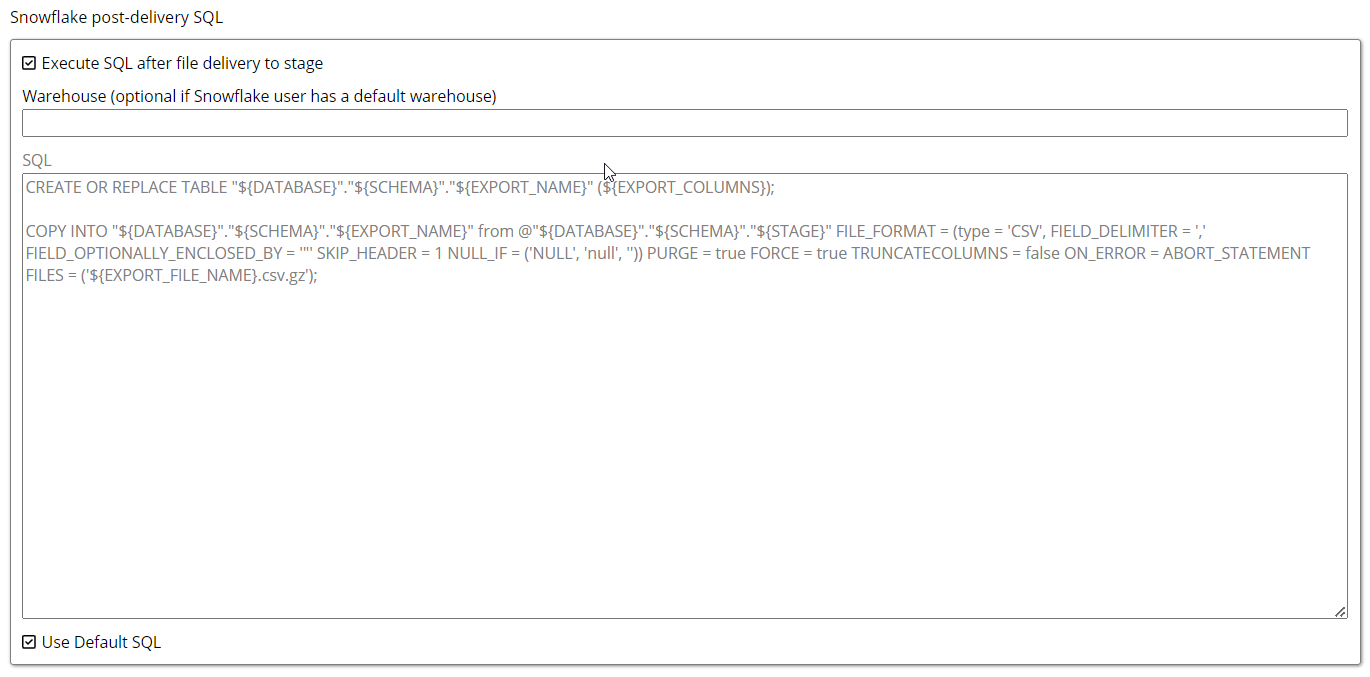
CREATE OR REPLACE TABLE: Creates a new table or replaces an existing table with the same name."${DATABASE}"."${SCHEMA}"."${EXPORT_NAME}": Identifies the database, schema, and table name.(${EXPORT_COLUMNS}): Specifies the table columns.${EXPORT_COLUMNS}is replaced with column definitions such as names and data types.COPY INTO: Loads data from files into the target table.FROM @"${DATABASE}"."${SCHEMA}"."${STAGE}": Identifies the named stage in the specified database and schema.TYPE = 'CSV': Treats the file as CSV.FIELD_DELIMITER = ',': Separates CSV columns with commas.FIELD_OPTIONALLY_ENCLOSED_BY = '"': Allows fields to be enclosed in double quotes.SKIP_HEADER = 1: Ignores the first row of the CSV file.NULL_IF = ('NULL', 'null', ''): TreatsNULL,null, and empty strings as database null values.PURGE = true: Removes files from the stage after they load.FORCE = true: Forces the command to execute even if certain conditions are not met.TRUNCATECOLUMNS = false: Prevents data from being truncated when it exceeds a column’s size.ON_ERROR = ABORT_STATEMENT: Aborts the entire statement when an error occurs during loading.FILES = ('${EXPORT_FILE_NAME}.csv.gz'): Specifies the compressed file to load.